Ten Ways to Press Play: BraPP's Record Player, Boombox and Jukebox
BraPP 2.1 swapped its play button for a record player you can tilt. How a drawn deck inside a web view talks to a SwiftUI game, why the song waits for the needle, and the ten players coming in 2.2.
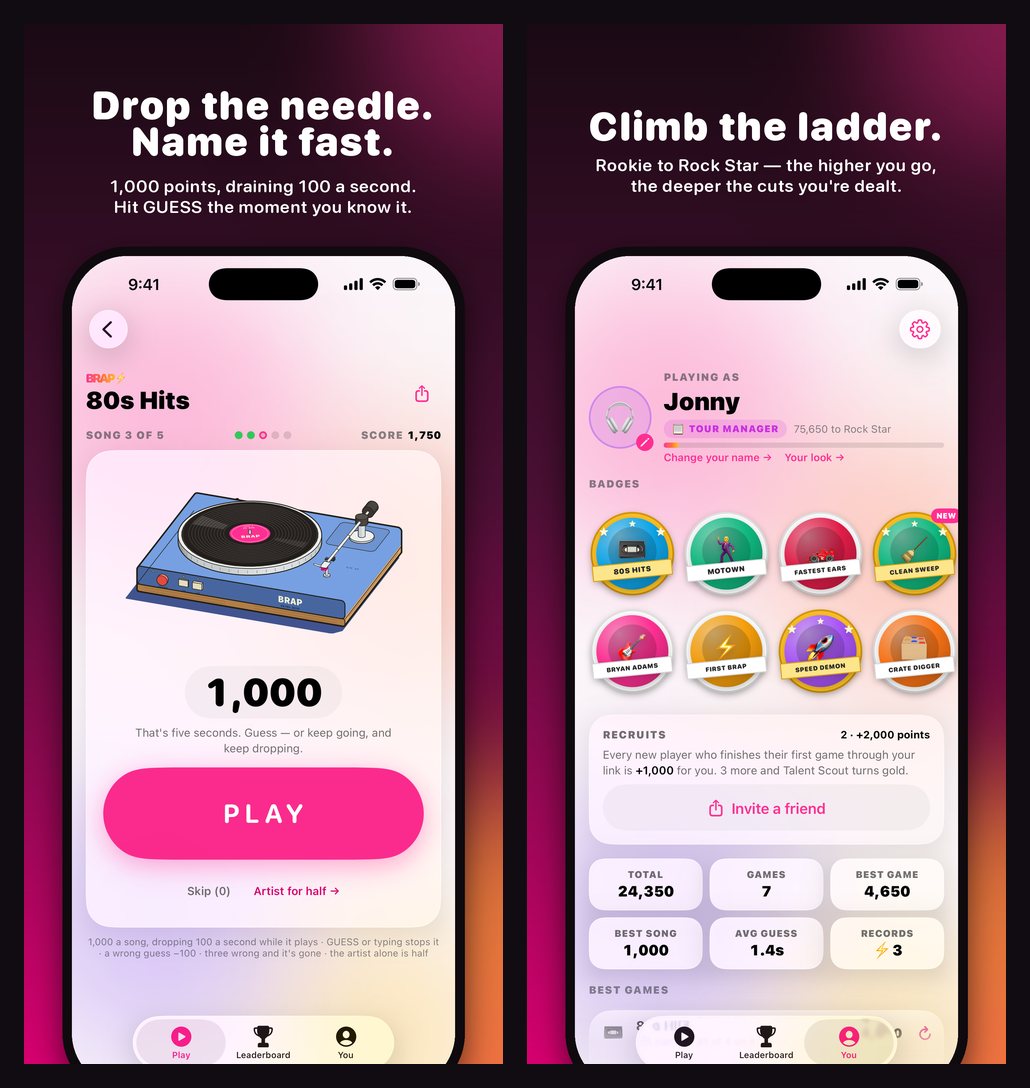
Up to version 2.0, BraPP started a song with a big pink play button. In 2.1 the button became a record player. You drop the needle, the platter spins, and the song starts when the stylus lands.
A drawing that takes orders
The deck isn't a sprite sheet or a 3D model. It's a hand-inked figure drawn with the MIT-licensed Colorfigures engine, built into a single HTML page and shown inside the game in a see-through web view with the page chrome switched off.
The app and the page talk through a tiny contract. The app calls into the page:
window.brapPlayer.play()
window.brapPlayer.stop()
window.brapPlayer.progress(0…1)
window.brapPlayer.speed(33 | 45)
and the page posts two messages back: "tap" when you touch the deck, and "down" when the needle reaches the groove.
The song waits for the needle
That "down" message matters. A press spins the platter and cues the arm, but the clip and the clock only start once the deck says the stylus has landed. The 1,000 points don't begin to drain during the animation, so the flourish never costs you anything. If the page is slow to answer, a 1.5 second fallback starts the song anyway.
While the five seconds play, the arm tracks inward with the clip. When it stops, the arm lifts home.
Tilt the phone, turn the deck
Tilt your phone and the record player turns a few degrees with it. That's CoreMotion steering the figure's camera. The motion is read off to the side so the game screen doesn't redraw for every wobble, and it switches off when Reduce Motion is on.
One player per rung
Because every player honours the same four calls and two messages, any of them can drop into the same slot. Version 2.1, the one on the App Store now, has three: the record player, a boombox and a CD player.
Version 2.2 is in TestFlight with ten, oldest technology to newest, one for each rung of the ladder:
| Player | Unlocks at | What it does |
|---|---|---|
| Gramophone | Fan (1,000) | Wind the crank, the horn sings. |
| Record player | Roadie (5,000) | The needle drops, then the song plays. |
| 8-track | Opening Act (10,000) | The cartridge clunks in and the loop runs. |
| Tape deck | Tour Manager (20,000) | The reels turn and the meters bounce. |
| Boombox | Headliner (50,000) | PLAY clunks down, the tape rolls, the speakers thump. |
| Pocket cassette | Rock Star (100,000) | Headphones on, the tape on your belt. |
| CD player | Chart Topper (250,000) | The disc spins up and the display counts. |
| MP3 player | Super Star (500,000) | A click of the wheel, a thousand songs. |
| Smart speaker | Global Phenomenon (1,000,000) | The light ring wakes and listens. |
| Jukebox | Legend (5,000,000) | The arm fetches a record, the lights dance. |
Each one has its own idea of "down": the needle in the groove, the tape up to speed, the disc reading. You pick yours, and the colour it comes in, under Your look. The classic pink button is still there if you'd rather have it.
Screenshots without a server
One more piece made all of this easier to ship. Launch the app with -demo and it serves canned answers instead of calling the server, with Apple's real previews and artwork so the player still plays. The App Store screenshots are captured that way by a script, then framed on the brand gradient with their headlines by another. When the play button turned into a turntable, new store screenshots were one command.
FREE Shopify Product Migration
Moving to Shopify? We'll migrate your product catalog for free. New stores only.